How to Use BIR Relief Data Entry V2.2

Written by:

RELIEF means  Reconciliation of Listings for Enforcement System.
This is in compliance with submission of  Summary List of Sales (SLS) and Summary List of  Purchases (SLP).

Here\’s a step by step guide on how to use the BIR Relief Data Entry System:

1. Dowload and Install  Relief Version 2.2
2. After installation, you will have these 3 shortcut Icons on your desktop (or select where you want it to save).
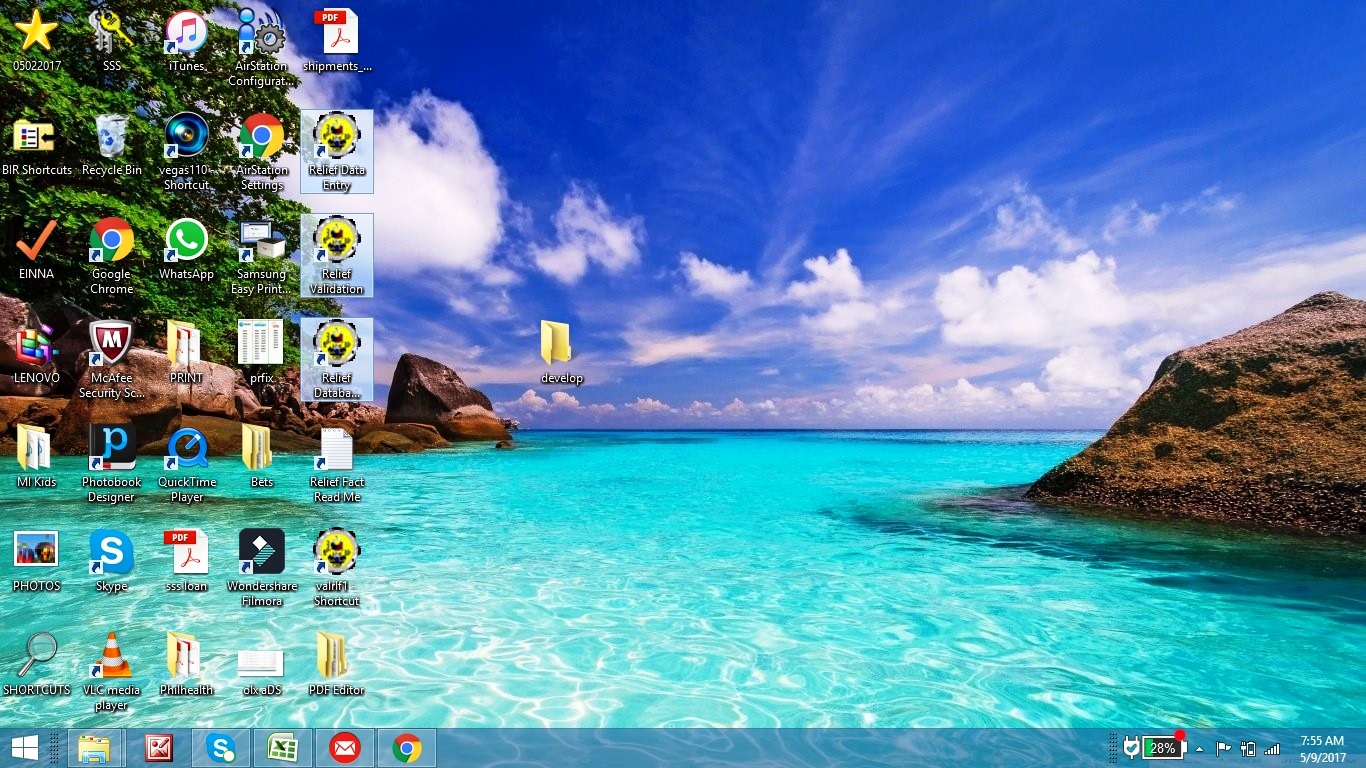
3. Double Click the Relief Data Entry Icon to get started.
You will be asked to enter your Username and Password. Use the credentials for your Computer\’s Administrator Account.
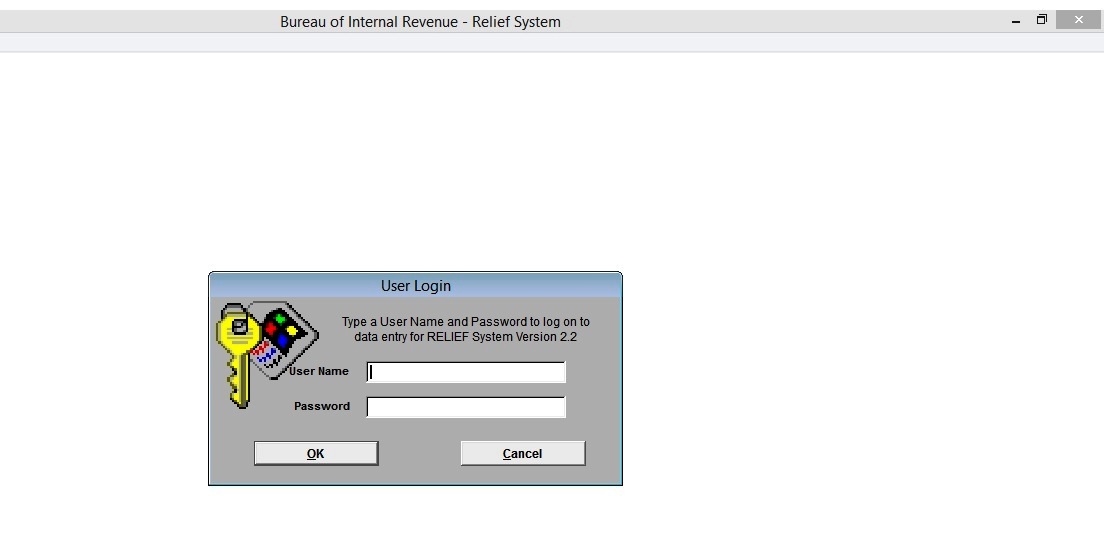
4. Update first the Owner\’s Info before encoding Sales or Purchases.
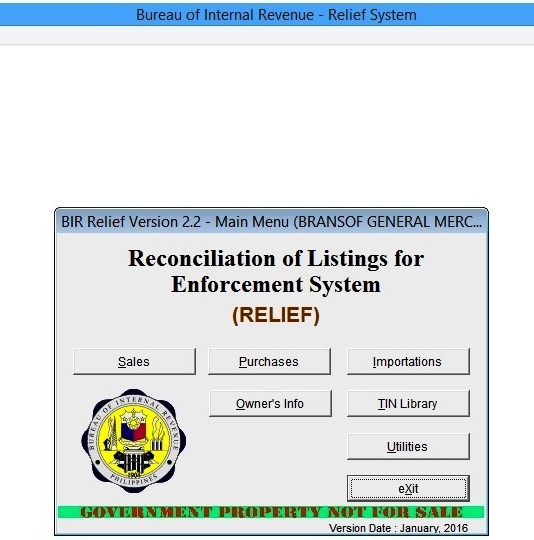

Encoding of Sales

➦From  Sales Transaction Menu, Choose the Taxable Month and Taxable Year then click Add/Update.

➦Sales Data Entry Screen will appear, Click the Add Button and start encoding the ff. for each sales transaction:
     →T.I.N., Registered Name (For Non-Individuals) / Last Name, First Name, or Middle Name for Individuals.
     →Substreet, Street, Barangay,  District/ City, Zip Code
     →Gross Taxable, Exempt/ Zero Rated (if applicable).
     →VAT rate value should be 10 or 12 only 

Remove Special Character like \”&\” if there\’s any to avoid validation errors.
Total Sales and Total Output Tax is computed automatically.
Click Save, and Add for next data to be encoded.

Encoding of Purchases

➦From  Purchase Transaction Menu, Choose the Taxable Month and Taxable Year then click Add/Update.

➦Purchase Data Entry Screen will appear, Click the Add Button and start encoding the ff. for each Purchase transaction:
     →T.I.N (is required), Registered Name (For Non-Individuals) / Last Name, First Name, or Middle Name for Individuals.
     →Substreet, Street, Barangay,  District/ City, Zip Code
     →Encode Exempt, Zero Rated, Capital Goods (if applicable)
     →Enter amount for Gross taxable
         Total Purchases, Taxable (Net of VAT), Services, Goods other than Capital Goods, and Total    Input Tax is computed automatically.

     →VAT rate value should be 10 or 12 only 

Click Save, and Add for next data to be encoded.

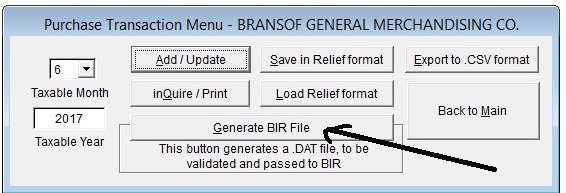
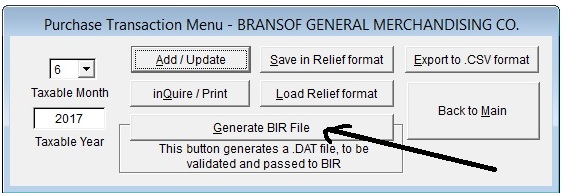
5. If done with encoding Sales or Purchases per month, EXIT and click Generate BIR File and Save.
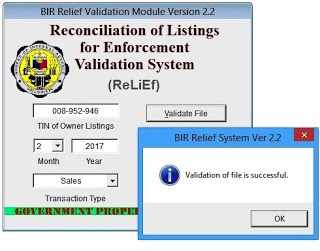
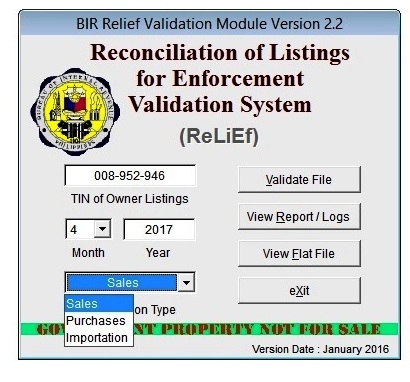
6. To Validate for submission, double Click Relief Validation Icon⇉ 

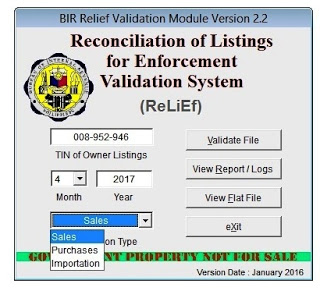
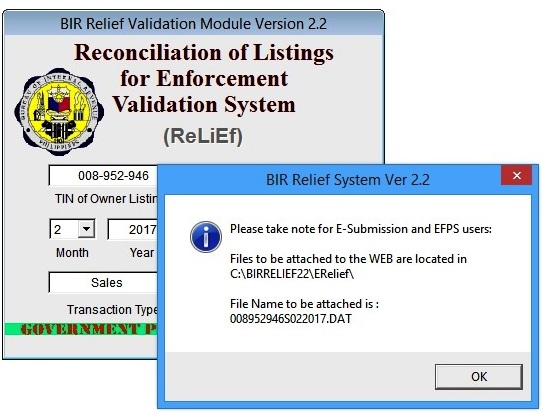
 From Relief Validation Module, Choose what Month, Year and Transaction Type (Sales/ Purchases) then Click Validate File.
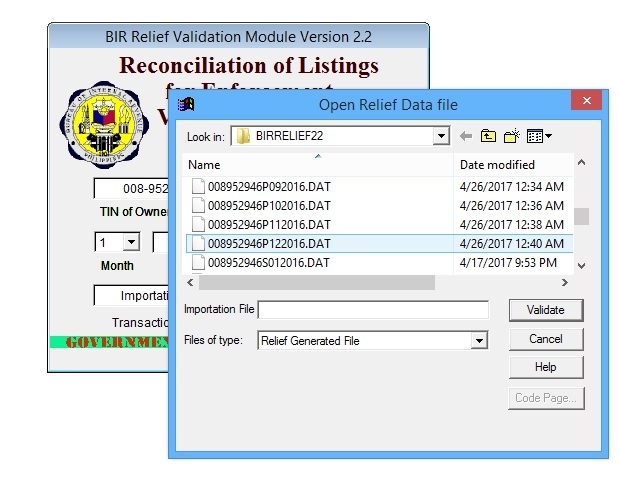
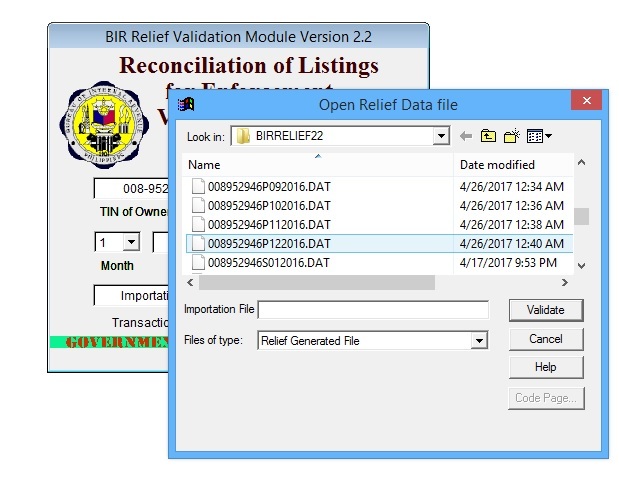
7. Open Relief Data file window will appear, choose what file to validate.
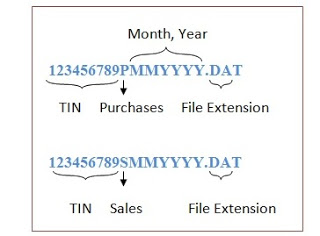
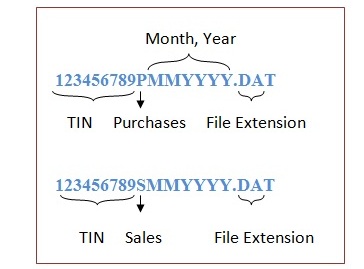
File Format: 
➦ Click Validate
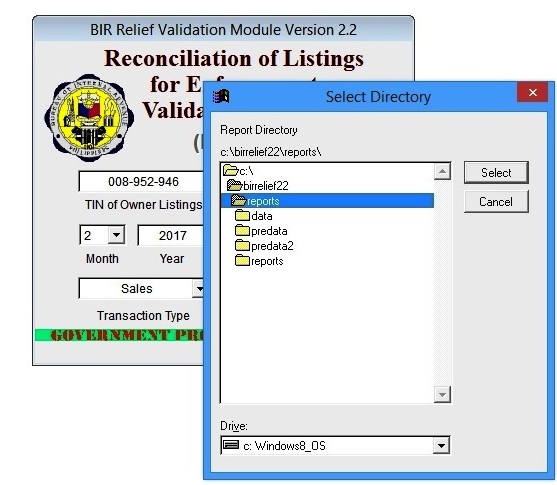
➦ Click Select
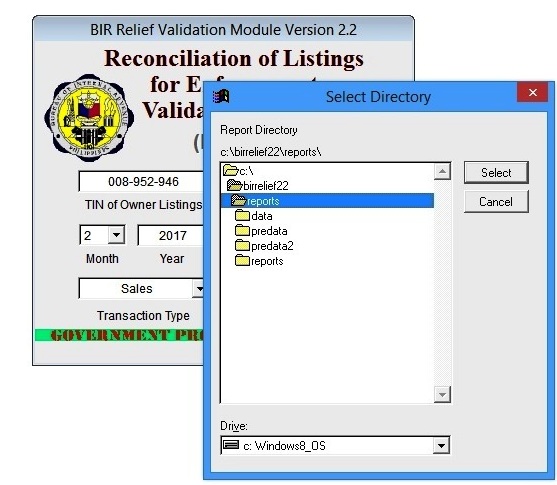
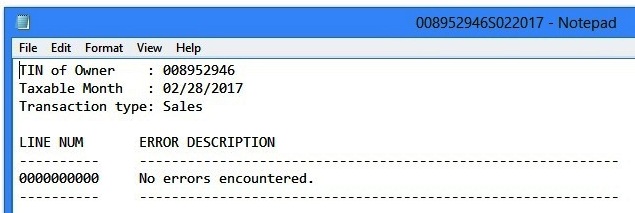
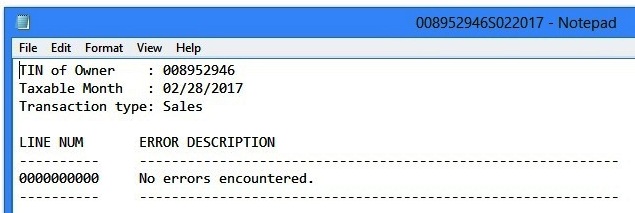
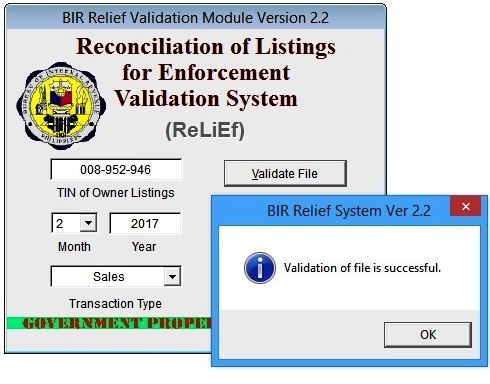
➦ The message \”Validation of file is successful\”  and a Notepad showing \”No Errors Encountered\” will appear.
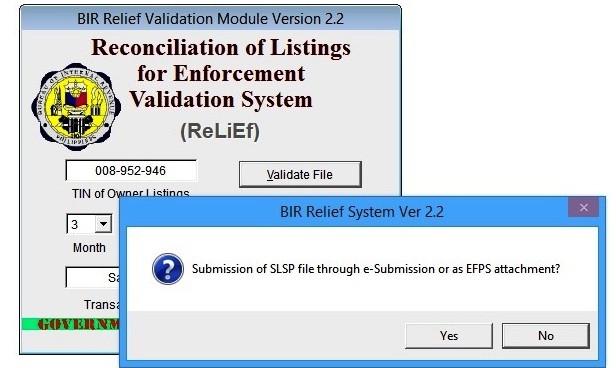
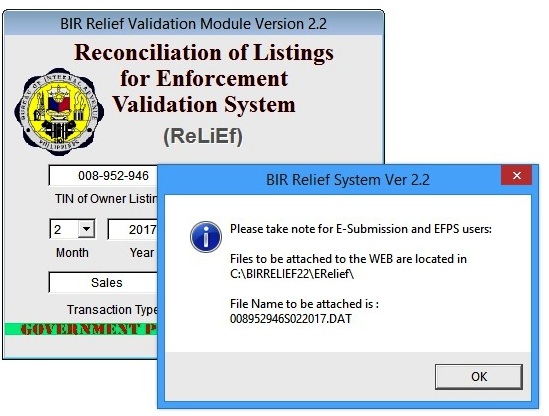
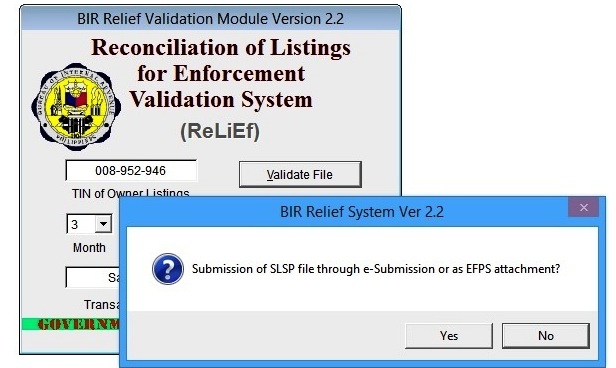
➦ Click Yes to submit as EFPS attachment.
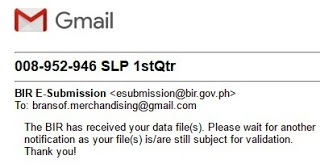
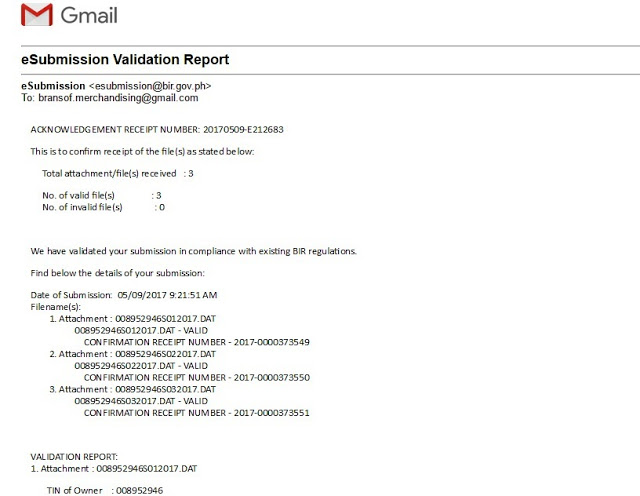
8. You can now submit the attachments to: esubmission@bir.gov.ph, and will receive a confirmation message saying that the received files is subject for validation.
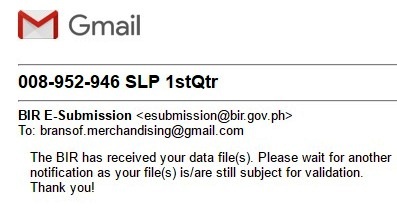
➦ Final message of  Validation Confirmation Receipt usually takes 2 to 3 days to receive.
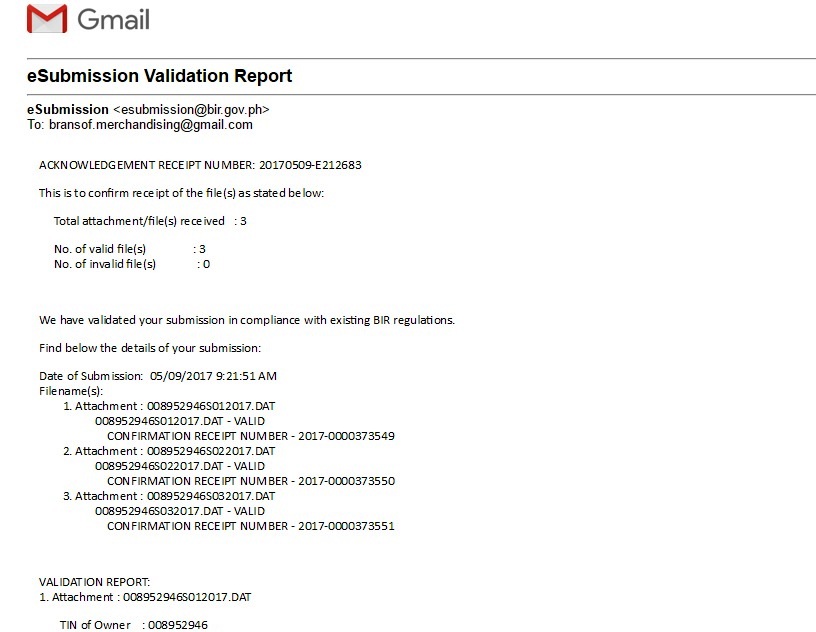
And, you\’re DONE! Print the validation email for your reference. Please take note that submission of files should be done quarterly; not later than 25th day after each quarter.

161 responses to “How to Use BIR Relief Data Entry V2.2”

  1. Anonymous Avatar
    Anonymous

    Thanks for posting the step-by-step process. Really appreciate it.

    Like

  2. EINz Avatar
    EINz

    You're most welcome! =)

    Like

  3. annbf1128 Avatar
    annbf1128

    Hi! thank you so much for posting this kind of a thing.it helps me a lot God Bless

    Like

  4. EINz Avatar
    EINz

    Welcome =D

    Like

  5. Unknown Avatar
    Unknown

    pay may error po?ano yung line num na sinasabi can't find the error po kasi thanks

    Like

  6. Anonymous Avatar
    Anonymous

    You and this post/user guide is heaven-sent. Thank you 🙂

    Like

  7. Anonymous Avatar
    Anonymous

    Thank you so much! God Bless po.

    Like

  8. EINz Avatar
    EINz

    line num, I think is from the sequence of data encoded. Look for possible special characters na na-encode

    Like

  9. EINz Avatar
    EINz

    Whoa… welcome po

    Like

  10. EINz Avatar
    EINz

    Welcome! Thanks for the visit =)

    Like

  11. Anonymous Avatar
    Anonymous

    hi. how can i import the files from relief data system version 2.1 to 2.2? thanks

    Like

  12. EINz Avatar
    EINz

    Sorry, but I'm not familiar with importing files from the old version, we started sa v2.2 kasi.

    Like

  13. Anonymous Avatar
    Anonymous

    hi. pano po palitan yung registered name na entered na previously?

    Like

  14. Anonymous Avatar
    Anonymous

    Hi, this easy step by step is very informative and helpful. Thank you so much!I have a question, you said that it takes 2 to 3 days to receive the Validation Report. What if it is more than 5 days and still I didn't receive any validation report, should I worry? Please advise

    Like

  15. EINz Avatar
    EINz

    Not clickable na yung registered name for edit, kaya delete ko na lang and encode as new entry.

    Like

  16. EINz Avatar
    EINz

    Hi! It happened before when I filed 2550M, it took more than a week for the confirmation receipt. Maybe delayed lang, but as for my experience, never pa ako hindi naka receive ng confirmation reply.

    Like

  17. Anonymous Avatar
    Anonymous

    Hi. Paano po if wala sales or purchases for the month? Ano po entry doon? Thank you

    Like

  18. Anonymous Avatar
    Anonymous

    hi po. pwede po ba mag login using muptiple account?

    Like

  19. EINz Avatar
    EINz

    Hi! I haven’t tried that… maybe you need to login din using a different computer user account?

    Like

  20. Unknown Avatar
    Unknown

    Hi po, pano pag hindi ako nakapag submit on time may penalty po ba?

    Like

  21. Unknown Avatar
    Unknown

    Hi po pano po pag hindi nakapag submit on time ng RELIEF may penalty po ba? And is it ok to submit kahit late na?

    Like

  22. EINz Avatar
    EINz

    Yep, pwede kahit late. Hindi ko alam before that we have to submit until I received a letter from BIR for non compliance. Wala namang nakalagay na penalty, and we submitted for the previous year up to present.

    Like

  23. Anonymous Avatar
    Anonymous

    Hi pasensya na. Sa purchases po ba kasama yung Salaries of employees? Vat-Exempt po ba siya or as service? Tapos pano po kapag walang TIN?

    Like

  24. EINz Avatar
    EINz

    Oops, sorry… we never encountered na walang sales or purchases kaya I have no idea kung okay lang ba na walang entry for that month.

    Like

  25. Unknown Avatar
    Unknown

    Hi po salamat po sa step by step guide ng VAT RELIEF na ginawa nyo, successful po yung validation. Now Im going to attach the DAT.file to my email, ask ko po anong SUBJECT ng email ko sa kanila? Sa sample po dito sa inyo —– TIN no./ SLP / quarter — tama po ba? ano po ibig sabihin ng SLP

    Like

  26. EINz Avatar
    EINz

    Welcome po. SLP- Summary List of PurchasesSLS – Summary List of Sales

    Like

  27. EINz Avatar
    EINz

    Hi! Hindi po kasama ang Salary, sa 1601C at 1702Q (other expenses) lang po yun ni rereport. Sa purchases purely materials lang dyan po kasi sila nag base sa input tax.

    Like

  28. Anonymous Avatar
    Anonymous

    Hi, just want to know..when encoding the quarterly purchases, do we have to create 3 files for the monthly purchases? I think i was doing wrong coz i always use the last month of the quarter to report all the purchases for the quarter. Please enlighten me 😀 Thanks in advance.

    Like

  29. EINz Avatar
    EINz

    Hello po. I always encode per month and create 3 files for validation. Haven’t tried 1 file submission for the quarter…

    Like

  30. angel25 Avatar
    angel25

    This is very helpful.Btw, the penalty for non-submission is 6250 per quarter or maximum of 25k. I think di naman lalabas yung unless you need tax clearance and makita nila yan

    Like

  31. angel25 Avatar
    angel25

    Pag wala din sales or purchases for the month, walang report na magegenerate. So hindi kailangan mag submit for that month. Since quarterly submission, submit lang kung ano yung meron for the quarter.

    Like

  32. Yan Avatar
    Yan

    Ask ko lang if pwede ba magsubmit kapag eemail na SLP and SLS in one email or kailangan na separate yung emails for purchases and sales for the quarter

    Like

  33. Yan Avatar
    Yan

    Hi kailangan ba separate yung sa sales and purchase kapag eemail na siya or pwede magkasama yung sales and purchases na attachment for a quarter?

    Like

  34. Anonymous Avatar
    Anonymous

    Hi po…tanong ko lang po, ano po ba dapat ilagay na TIN kung branch na po yung pinagbihan? Kasi po it should be 9 digit lang po diba. Thanks in advance.

    Like

  35. EINz Avatar
    EINz

    Haven’t tried sending in one mail. Lagi ko syang separate para malinaw sa confirmation.

    Like

  36. Anonymous Avatar
    Anonymous

    per receipt po ba yung encoding or per business? and pano po yng sa sales kung di alam ytung tin kasi various customers naman,,

    Like

  37. Jhay Avatar
    Jhay

    Punta ka sa TIN Library, pwede mag-edit dun

    Like

  38. Jhay Avatar
    Jhay

    You dont need to import files. copy mo lang yung mga .exe file nung na-install mo yung new version sa target folder mo. ver 2.3 na po ang latest version

    Like

  39. Unknown Avatar
    Unknown

    paano po kung zero purchase and sales need pa po ba yaneh filed mam?

    Like

  40. EINz Avatar
    EINz

    As in kahit purchase wala? If none, you can skip for that month.

    Like

  41. EINz Avatar
    EINz

    per receipt. Just encode the customer name if walang TIN

    Like

  42. EINz Avatar
    EINz

    if branch hindi ko na ini encode yung last 3. Anyway, sila pa rin naman yun.

    Like

  43. EINz Avatar
    EINz

    Wow, ang laki pala! I do requested for clearance, thankfully… wala naman lumabas. puro 1601C lang na namissed!

    Like

  44. Anonymous Avatar
    Anonymous

    Hi, I have almost 1k lines to encode. is there a way na mapadali? hindi isa isang encode? thanks!

    Like

  45. EINz Avatar
    EINz

    I don't think there's a shortcut for that. I encode every entry, and copy paste na lang sa TIN# para mabilis.

    Like

  46. Anonymous Avatar
    Anonymous

    Bakit hindi po ako nakakatanggap ng confirmation reply? EFPS registered po kami.

    Like

  47. Anonymous Avatar
    Anonymous

    Kapag nakapagsubmit na po ba ng Vat Relief online, kailangan pa ba mag submit ng hard copy sa BIR office? salamat.

    Like

  48. EINz Avatar
    EINz

    No need to submit hardcopy.

    Like

  49. Anonymous Avatar
    Anonymous

    Ask po ako ulit, kasi pag submit ko po ng vat relief nagreply nman po ng confirmation na na-receive nila yung slsp namin, pero til now yung validation confirmation receipt wala pa rin po. Okay lang po ba if ever di talaga ma-sent sa amin yung validation confirmation receipt? salamat.

    Like

  50. Anonymous Avatar
    Anonymous

    Thank you so much! big help it is..more power

    Like

Leave a comment